CPU vs GPU vs TPU vs NPU vs LPU vs DPU — The 6 AI Chips Fully Explained (2026)
Published:June 1, 2026
Introduction: Why Chip Choice Matters More Than Ever
The AI hardware landscape has quietly fractured into six distinct architectural families. This isn't just marketing taxonomy — each chip exists because it wins decisively in certain conditions and fails catastrophically in others.
Pick the wrong chip for your AI workload and you're either overpaying by 10x, bottlenecking your throughput, or burning power you don't need to. Understanding these six processors is no longer optional for AI engineers, product managers, or infrastructure teams — it's foundational knowledge for 2026 and beyond.
Let's break them down one by one.
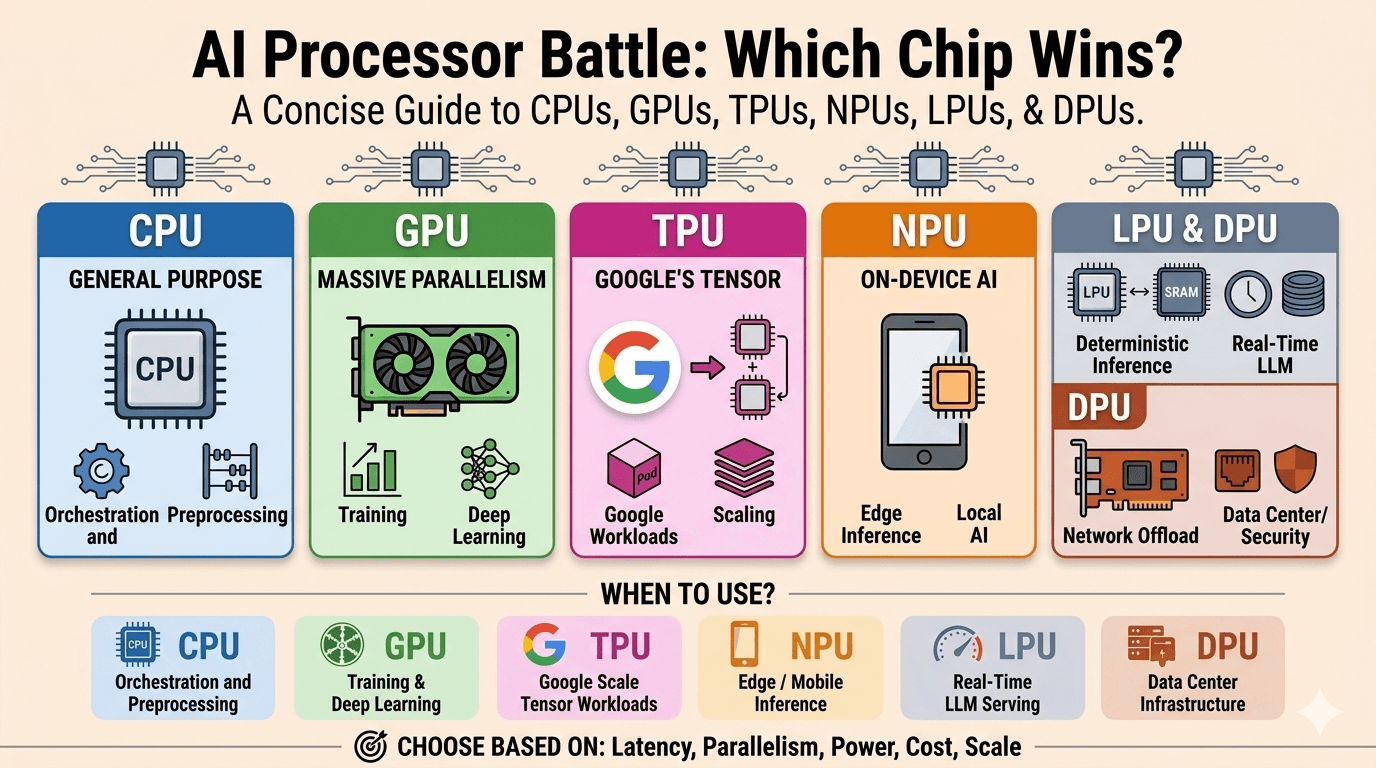
Six chip families, six different jobs — pick the wrong one and you overpay, bottleneck throughput, or burn power you do not need.
CPU — Central Processing Unit: The Backbone
Tagline: General-purpose. Flexible. The orchestrator of everything. Made by: Intel, AMD
The CPU is the brain of every computer. Built for latency-optimized, sequential processing, it excels at complex logic, branching, OS-level tasks, and orchestration. A modern CPU has a handful of powerful cores with deep cache hierarchies and sophisticated branch predictors — all engineered to make a single thread run as fast as physically possible.
However, the CPU's architecture is fundamentally inefficient for the repetitive, parallel math that neural networks demand. A 1,024×1,024 matrix multiplication involves roughly two billion arithmetic operations — a task where the CPU's sequential design becomes a serious bottleneck.
Workflow:
User Request → CPU Schedules → Routes to Processor → Manages I/O → Returns Result
Pros
- Handles any task — the ultimate generalist
- Best single-thread performance of any chip
- Runs the OS and orchestrates all other processors
Cons
- Slow at parallel math operations
- Cannot train large AI models efficiently
- Low AI throughput compared to specialized chips
Best For
Orchestration, data preprocessing, pipelines, anything with complex conditional logic.
GPU — Graphics Processing Unit: Massive Parallelism
Tagline: Thousands of cores. Built for AI training. The current king. Made by: NVIDIA, AMD Key tech: HBM3, CUDA ecosystem, Tensor Cores
The GPU is the workhorse of modern AI. Instead of a few powerful cores, GPUs spread work across thousands of smaller cores that all execute the same instruction on different data simultaneously — the SIMT (Single Instruction, Multiple Threads) model. For neural network arithmetic, this is transformative.
Modern GPUs like the NVIDIA H100 feature dedicated Tensor Cores hardwired for matrix-multiply-accumulate operations, and use High Bandwidth Memory (HBM3) to feed those cores at terabytes-per-second throughput. The CUDA ecosystem further cements NVIDIA's dominance with a massive library of optimized AI kernels.
Workflow:
Load Model → Distribute Across Cores → Matrix Multiply → Backpropagate → Update Weights
Pros
- Massive parallelism — thousands of cores working simultaneously
- Great for both training and inference
- Huge CUDA ecosystem with mature tooling
Cons
- Very high power draw (H100 draws up to 700W)
- Extremely expensive (H100 ~$30,000+)
- Overkill for small or simple tasks
Best For
Deep learning training, large-scale inference, computer vision, LLM fine-tuning.
TPU — Tensor Processing Unit: Google-Scale Tensor Processing
Tagline: Compiler-controlled. Systolic array. Built for Google-scale. Made by: Google Key tech: Systolic array, large TPU pods (up to 9,216 TPUs)
Google's TPU takes specialization one step further. At its core is a systolic array — a grid of multiply-accumulate (MAC) units where data flows through in a wave pattern. Weights enter from one side, activations from the other, and partial results propagate without returning to memory each time — eliminating the memory bottlenecks that plague GPUs.
The entire execution is compiler-controlled, not hardware-scheduled, making it extremely predictable and efficient. TPUs scale massively — a single TPU pod can contain up to 9,216 TPUs working in lockstep. Google broke free from GPU dependency using TPUs internally, and is now reportedly selling TPU access to external hyperscalers.
Workflow:
Load Model → Systolic Array Processing → Matrix Ops On-Chip → Pod Scales to 9,216 TPUs → Trained Model
Pros
- Lower cost for large tensor workloads
- Better performance per watt than GPU
- Scales exceptionally well in pods
Cons
- Mostly tied to Google Cloud
- Less flexible than GPU
- Limited framework support (primarily JAX/TensorFlow)
Best For
Google-scale tensor workloads, large model training on Google Cloud, JAX-based ML pipelines.
NPU — Neural Processing Unit: AI in Your Pocket
Tagline: On-device. Ultra-low power. Private by design. Found in: Apple Silicon, Qualcomm Snapdragon, Intel Core Ultra, MediaTek Dimensity Key tech: INT8/INT4 quantized inference, on-chip SRAM, no cloud needed
The NPU is the edge-optimized AI chip embedded in your smartphone, laptop, or IoT device. Its architecture is built around a Neural Compute Engine packed with MAC arrays and on-chip SRAM, but instead of power-hungry HBM, it uses low-power system memory. The design goal: run AI inference at single-digit watt power budgets.
NPUs use INT8/INT4 quantized inference — trading a small amount of accuracy for massive gains in speed and power efficiency. The key advantage is that data never leaves the device, making it ideal for privacy-sensitive applications like on-device voice recognition, face unlock, and local LLM assistants.
Workflow:
User Input → On-Device NPU Activates → INT8/INT4 Quantized → Inference in Milliseconds → Instant Response
Pros
- Very low power consumption
- No cloud latency — responses are instant
- Data stays on device (strong privacy guarantee)
Cons
- Inference only — cannot train models
- Limited model size due to on-device memory
- Less accurate and flexible than larger accelerators
Best For
Edge / mobile AI inference, on-device assistants, wearables, IoT, privacy-first applications.
LPU — Language Processing Unit: Fast, Deterministic Inference
Tagline: Zero cache misses. Blazing token speed. Built for LLMs. Made by: Groq Key tech: On-chip SRAM, deterministic execution, compiler-scheduled
The LPU, pioneered by Groq (founded by ex-Google engineers who invented the TPU), is the newest entrant in the AI chip race. Its radical design decision: remove off-chip memory entirely. All model weights live in on-chip SRAM, which is 20–100x faster to access than DRAM or HBM. Execution is fully deterministic and compiler-scheduled — zero cache misses, zero runtime scheduling overhead.
The result is blazing fast token generation — Groq's LPU can produce tokens at speeds that make GPU-based inference feel sluggish. The tradeoff is capacity: SRAM is physically bulky and expensive, so each chip holds limited memory, requiring many chips linked together for large models.
Workflow:
Prompt Input → Weights Loaded from On-Chip SRAM → Deterministic Execution → High Tokens/Sec → Fast Response
Pros
- Extremely fast inference — fastest token generation available
- Zero cache-miss style design
- Fully deterministic execution
Cons
- Inference only — no training capability
- Limited memory per chip
- Often needs many chips linked together for large models
Best For
Real-time LLM serving, low-latency chatbots, high-throughput token generation.
DPU — Data Processing Unit: The Invisible Layer
Tagline: Infrastructure offload. Hardware-level security. The unsung hero. Made by: NVIDIA (BlueField), AMD (Pensando), Intel (IPU E2100) Key tech: SmartNIC, network offload, encryption, storage I/O routing
The DPU is the most overlooked chip in AI infrastructure — yet arguably the most critical at scale. It acts as a SmartNIC / Infrastructure Processor that intercepts network traffic, handles encryption/firewall, manages storage I/O routing, and offloads all of this from the CPU — freeing it entirely for AI workloads.
The DPU SmartNIC market reached $1.11 billion in 2024 and is projected to grow to $4.44 billion by 2034 at a 15% CAGR. Around 50% of cloud providers now rely on DPUs. NVIDIA's BlueField-3 DPU — with 22 billion transistors — delivers the equivalent of 300 CPU cores in infrastructure services offload. As AI clusters shift traffic east-west between GPUs, DPUs have become essential to prevent CPU bottlenecks from strangling GPU utilization.
Workflow:
Network Traffic → DPU Intercepts in Hardware → Encryption + Firewall → Storage I/O Routing → CPU Freed for AI Workloads
Pros
- Frees CPU entirely for AI applications
- Hardware-level security (encryption, firewall, DDoS prevention)
- High-speed networking at line rate
Cons
- Not for typical consumers or edge use
- Complex to configure and deploy
- Niche infrastructure use case
Best For
Data center infrastructure, AI cluster networking, cloud security offload, hyperscale deployments.
Side-by-Side Comparison (2026)
| Chip | Primary Role | Parallelism | Flexibility | Power Efficiency | Typical Environment |
|---|---|---|---|---|---|
| CPU | General computing | Low | Very High | Low–Medium | PCs, servers |
| GPU | Parallel AI compute | Very High | Medium | Medium | AI training, graphics |
| TPU | ML tensor ops | Very High | Low | Very High | Google Cloud AI |
| NPU | Edge AI inference | Medium | Low | Very High | Mobile / edge devices |
| LPU | LLM inference | High | Very Low | High | Generative AI serving |
| DPU | Infrastructure offload | Medium | Low | High | Data centers |
When to Use Which? (Quick Reference)
| Use Case | Best Chip |
|---|---|
| Training a large language model | GPU or TPU |
| Running a chatbot in real-time | LPU |
| On-device AI on a smartphone | NPU |
| Data preprocessing & orchestration | CPU |
| Google Cloud ML workloads | TPU |
| Securing a data center AI cluster | DPU |
| Fine-tuning a model | GPU |
| Privacy-first edge inference | NPU |
Golden Rule: Choose based on latency, parallelism, power, cost, and scale.
Conclusion: There Is No "Best" Chip — Only the Right Chip for the Job
The AI hardware landscape of 2026 is not a competition — it's a collaboration. A production AI system might use:
- A CPU to preprocess and orchestrate
- A GPU to train the model
- A TPU for large-scale cloud inference
- An NPU to run on-device
- An LPU to serve real-time responses
- A DPU to keep the entire infrastructure running securely
The wrong chip for the wrong job silently costs teams performance and money. Mastering these six architectures is the difference between an AI system that scales gracefully and one that burns budget at every layer.